Version 2.5.3 - Hide and isolate selected tasks and unselect empty locations

New: 

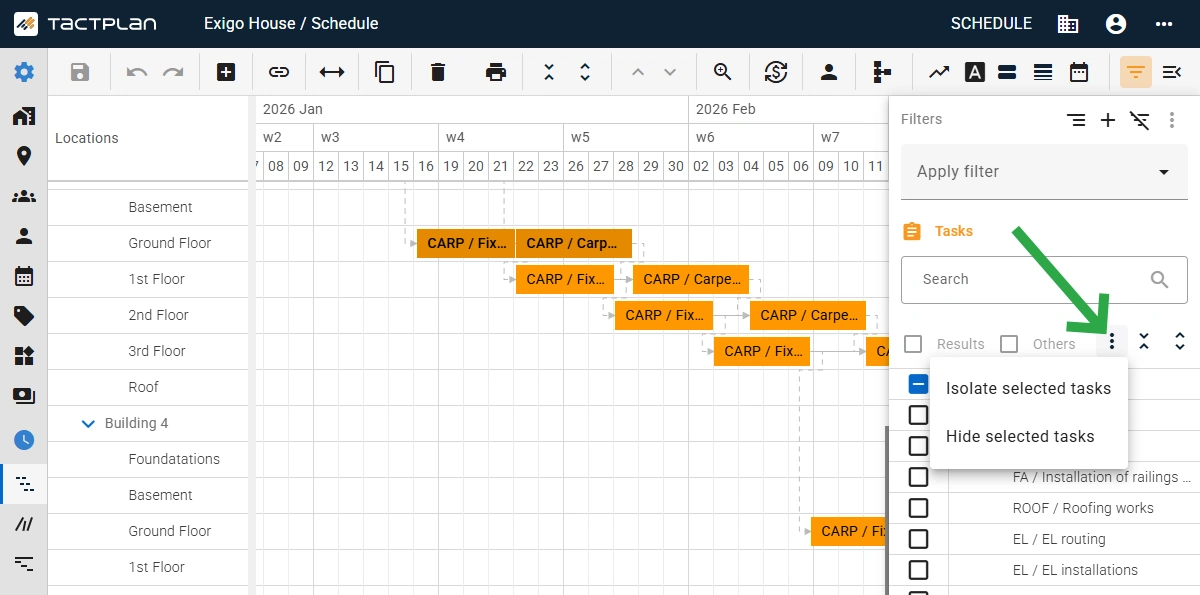
  • Added option in the filter panel to isolate or hide tasks based on selected task in the schedule view.
  • Added option in the filter panel to isolate or hide locations based on the corresponding location task in the schedule view.
  • Added option in the filter panel to deselect empty location, which is location currently with no locations tasks.
  • Added link to the Tactplan Help Center via top bar more icon - support.tactplan.com
  • Support for printing bigger schedules to PDF.
  • Updated of the welcome screen for new users with "get started" guide bullets.
  • Added an option to toggle on/off if quantity change adjusts duration. When toggle is off then change in linked quantity, directly to task or via cost item, will preserve the durations of the location tasks, by adjusting the production factor. The "Quantity change adjusts duration" option is set per task in the task panel on the general tab. Note that the toggle with not affect change in work by e.g. by changing the consumption rate as this will still change duration.

Improvements: 

  • Updated header setup for the Grid view
  • Improved data parser to better support all localizations for dates during export/import

Pytania?

Skontaktuj się z nami pod adresem info@tactplan.com.
Często sprawdzamy naszą skrzynkę odbiorczą.

Dobry plac budowy zaczyna się od planu

Dzięki harmonogramowaniu opartemu na lokalizacji każdy rzemieślnik wie dokładnie, gdzie powinien być i jakie zadania ma do wykonania. Efektem jest spokojniejszy i bardziej przewidywalny dzień pracy - stały postęp, brak straconego czasu i lepsza współpraca na placu budowy - tworząc podstawę dla niezawodnej realizacji projektów.
Wypróbuj bezpłatnie przez 14 dni.